Make Digital Visiting Card: Complete 2026 Guide
13 minutes
12th of June 2026
In this article:
- Understanding Digital Visiting Card Fundamentals
- Strategic Planning Before Creation
- Content Selection and Optimization
- Design Principles and Brand Consistency
- Platform Selection and Technical Implementation
- Sharing Methods and Distribution Strategy
- Lead Capture and Conversion Optimization
- Analytics and Performance Measurement
- Team Deployment and Corporate Rollout
- Privacy, Security, and Compliance Considerations
- Mobile Optimization and Cross-Platform Compatibility
- Advanced Features and Innovation
- Cost Analysis and ROI Calculation
- Best Practices from High-Performing Users
The business card has evolved dramatically over the past decade, transitioning from printed cardstock to dynamic digital formats that live on smartphones and cloud platforms. When you make digital visiting card solutions in 2026, you're creating far more than a simple contact exchange tool. You're building a networking asset that updates in real time, captures leads automatically, integrates with CRM systems, and provides measurable analytics on every interaction. This comprehensive guide walks you through the strategic decisions, technical implementations, and best practices that separate amateur digital cards from professional-grade networking tools that drive genuine business results.
Understanding Digital Visiting Card Fundamentals
Digital visiting cards represent a paradigm shift in how professionals exchange and manage contact information. Unlike traditional paper cards that become outdated the moment you change phone numbers or get promoted, digital versions update automatically across all previously shared instances.
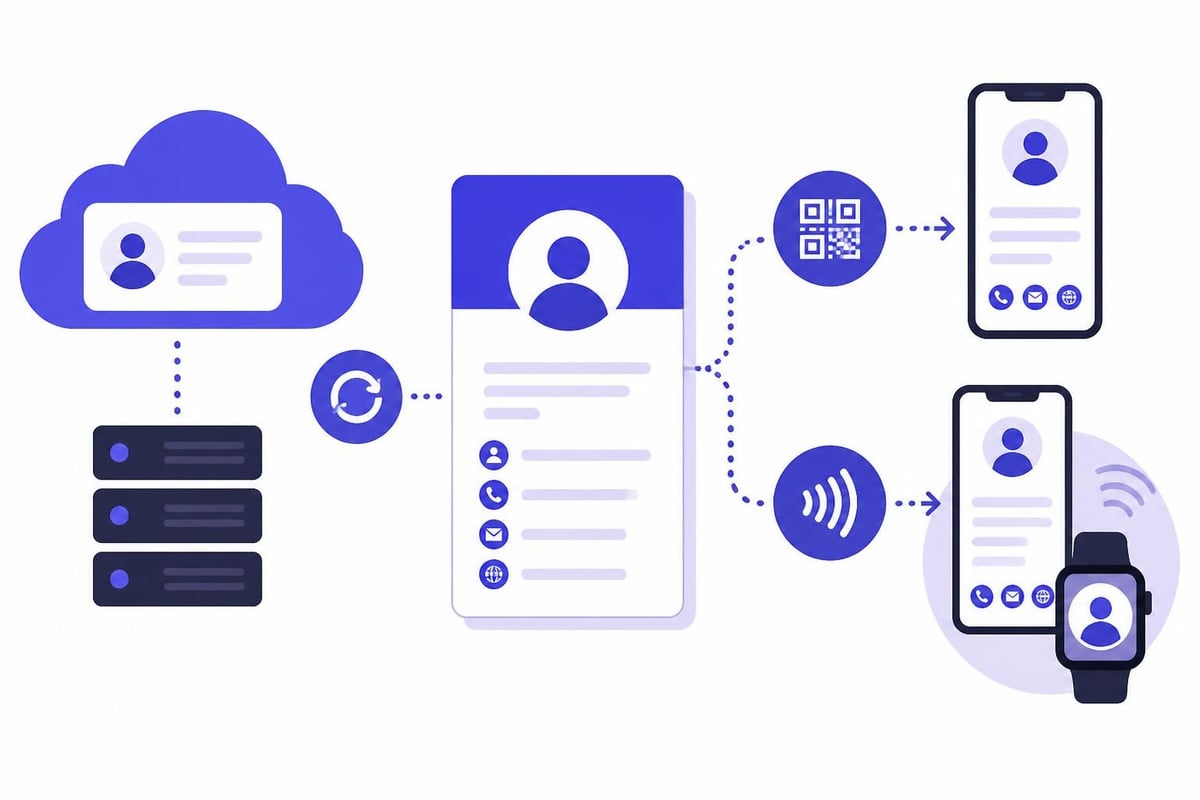
The core technology behind these cards combines several elements working together seamlessly. QR codes provide instant scanning capabilities that work on any smartphone camera without requiring special apps. NFC (Near Field Communication) enables tap-to-share functionality for Android devices and newer iPhones. Cloud storage ensures your information stays synchronized across all platforms, while API integrations connect your card to existing business systems.
Technical Architecture and Data Flow
When you make digital visiting card systems, understanding the underlying architecture helps you make informed platform choices:
| Component | Function | Business Value |
|---|---|---|
| Cloud Database | Stores contact information centrally | Single source of truth, instant updates |
| QR/NFC Layer | Facilitates physical-to-digital handoff | No app required, universal compatibility |
| API Endpoints | Connects to CRMs and HR systems | Automated workflows, reduced manual entry |
| Analytics Engine | Tracks views, shares, and interactions | Measurable networking ROI |
The data flow typically begins when someone scans your QR code or taps your NFC card. Their device retrieves your current information from the cloud database, where you can update details at any time. This architecture means contacts always see your latest information, even years after the initial connection.
Strategic Planning Before Creation
Successful digital cards begin with clear strategic objectives rather than jumping directly into design tools. Define what you want your card to accomplish beyond simple contact exchange.
Primary Goals to Consider:
- Lead generation with built-in contact forms
- Event attendance tracking through unique QR codes
- Product demonstration via embedded videos
- Appointment scheduling with calendar integrations
- Team brand consistency across departments
- CRM integration for automatic contact syncing
Your goals directly influence which features matter most. A sales professional needs lead capture forms and CRM integration, while a creative director prioritizes portfolio galleries and video backgrounds. When you make a digital visiting card, aligning features with objectives prevents feature bloat and keeps cards focused on conversion.
Audience Analysis and Information Architecture
Different audiences expect different information hierarchies on your card. Corporate buyers want credentials and company information prominently displayed. Creative clients care more about portfolio samples and aesthetic presentation. Service providers need scheduling tools front and center.
Structure your information based on the question "What does my typical contact need to know first?" Lead with that answer. Secondary information can appear below the fold or on separate tabs. This user-centric approach significantly improves engagement rates compared to dumping all information at once.
Content Selection and Optimization
The content you include when you make digital visiting card designs directly impacts how recipients perceive your professionalism and whether they take desired actions.
Essential Information Elements:
- Full name and professional title
- Company name and logo
- Primary contact method (phone or email)
- Professional photo (current, high-quality)
- Primary call-to-action
Optional But Powerful Additions:
- Video introduction (15-30 seconds)
- Social media links (LinkedIn, Twitter, Instagram)
- Product catalogs or service menus
- Testimonials or case studies
- Calendar booking links
- File downloads (brochures, presentations)
According to recent digital business card research, cards with embedded video content receive 40% more callback rates than text-only versions. However, video must be professional quality and genuinely valuable rather than included just for novelty.
Writing Effective Copy
The text on your digital card should be concise, action-oriented, and focused on recipient benefits. Avoid generic phrases like "passionate professional" or "results-driven expert." Instead, use specific value propositions that differentiate you from competitors.
For example, rather than "Marketing Consultant," try "Help B2B SaaS Companies Double Qualified Leads in 90 Days." This specificity immediately communicates what you do and for whom, making it easier for contacts to remember you and refer relevant opportunities.
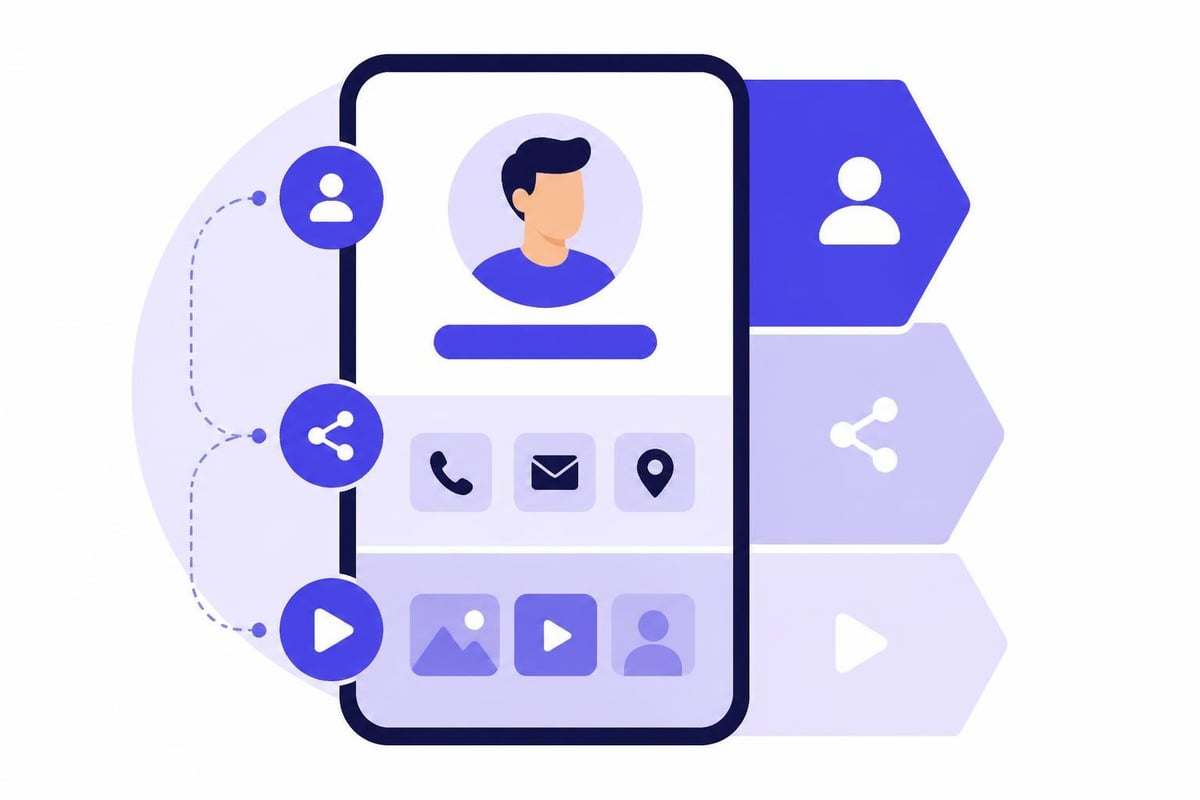
Design Principles and Brand Consistency
Visual design significantly impacts first impressions when you make digital visiting card assets. Poor design undermines credibility regardless of your actual competence, while professional design enhances perceived expertise.
Core Design Principles:
- Whitespace: Don't crowd every pixel. Breathing room improves readability.
- Hierarchy: Use size, color, and positioning to guide attention.
- Contrast: Ensure text is readable against all backgrounds.
- Consistency: Match brand colors, fonts, and imagery.
- Mobile-First: Design for smartphone screens where most viewing occurs.
For corporate users, brand consistency becomes critical. Every team member's card should use identical logos, color schemes, corporate fonts, and layout structures. This consistency reinforces brand recognition and professional image across all customer touchpoints.
| Design Element | Best Practice | Common Mistake |
|---|---|---|
| Profile Photo | Professional headshot, consistent lighting | Casual selfies, cropped group photos |
| Color Palette | 2-3 brand colors maximum | Rainbow of unrelated colors |
| Typography | 2 fonts: one for headers, one for body | 4+ different fonts |
| Background | Solid color or subtle gradient | Busy patterns that compete with text |
When selecting custom fonts, ensure they're web-safe or properly licensed for digital use. System fonts provide universal compatibility, while custom fonts create stronger brand identity but require proper embedding to display correctly across all devices.
Platform Selection and Technical Implementation
Choosing the right platform when you make digital visiting card systems dramatically affects both creation ease and long-term functionality. Evaluate platforms based on your specific needs rather than generic feature lists.
Key Evaluation Criteria:
- Customization depth (colors, fonts, layouts, backgrounds)
- Sharing methods (QR, NFC, wallet integration, links)
- Analytics and tracking capabilities
- Integration options (CRM, calendar, HR systems)
- Team management features
- Data compliance (GDPR, CCPA)
- Mobile app availability
- Support and onboarding
For individual professionals, simplicity and quick setup often matter most. Creating your digital business card should take minutes, not hours. For enterprises, integration capabilities and centralized management become non-negotiable requirements.
Enterprise vs. Individual Solutions
Individual solutions prioritize ease of use and personal customization. You typically create one card, update it occasionally, and share it through whichever method feels most natural in each networking situation.
Enterprise solutions require fundamentally different architecture. HR systems should automatically provision new cards when employees join and update them when roles change. Marketing should control brand elements while individuals manage their own contact details. Analytics should roll up to team and department levels for ROI measurement.
For teams needing centralized control with individual flexibility, digital business cards for teams provide the infrastructure to manage hundreds or thousands of cards while maintaining brand consistency and enabling HR automation.
Sharing Methods and Distribution Strategy
A perfectly designed digital card delivers zero value if you don't share it effectively. Modern digital cards offer multiple sharing methods, each suited to different networking contexts.
Primary Sharing Channels
QR Code Display: Generate a unique QR code linked to your card and display it on physical materials, email signatures, virtual backgrounds, or presentation slides. Anyone can scan it instantly without asking for contact information, reducing friction in networking situations.
NFC Card Tap: Physical NFC cards combine the tactile satisfaction of exchanging traditional business cards with instant digital transfer. Tap your NFC card to any smartphone and your information transfers immediately. This method works exceptionally well at conferences and trade shows where the physical exchange creates a memorable moment.
Mobile Wallet Integration: Adding your card to Apple Wallet or Google Wallet puts it one tap away on every smartphone. Recipients can save your information directly to their native contacts app without manual typing. This integration significantly increases the likelihood that your information actually gets saved rather than forgotten.
Direct Link Sharing: Share your card URL through email, text message, LinkedIn, or any digital channel. This method works well for virtual networking and online communities where QR codes aren't practical.
| Sharing Method | Best Context | Conversion Rate |
|---|---|---|
| QR Code Scan | In-person events, presentations | High (70-85%) |
| NFC Tap | Conferences, trade shows | Very High (85-95%) |
| Wallet Pass | Post-meeting follow-up | Medium (50-65%) |
| Direct Link | Virtual networking, email | Medium (45-60%) |
The most effective strategy combines multiple methods. Display your QR code on your laptop during video calls, carry NFC cards for in-person meetings, include your link in email signatures, and add your card to mobile wallets for easy follow-up sharing.
Lead Capture and Conversion Optimization
Beyond sharing your own information, strategic digital cards actively capture leads and drive specific business actions. This transformation from passive contact exchange to active lead generation separates basic cards from revenue-generating tools.
Conversion-Focused Features:
- Contact forms that capture leads directly into your CRM
- Calendar booking links for automatic appointment scheduling
- Product showcases with purchase links
- Video testimonials that build credibility
- Case study downloads gated behind email capture
- Social proof elements (client logos, awards, certifications)
When you make digital visiting card systems with lead capture, you transform every networking interaction into a measurable marketing activity. Someone scanning your card at a conference can immediately book a demo, download your pricing guide, or sign up for your newsletter without any additional steps.
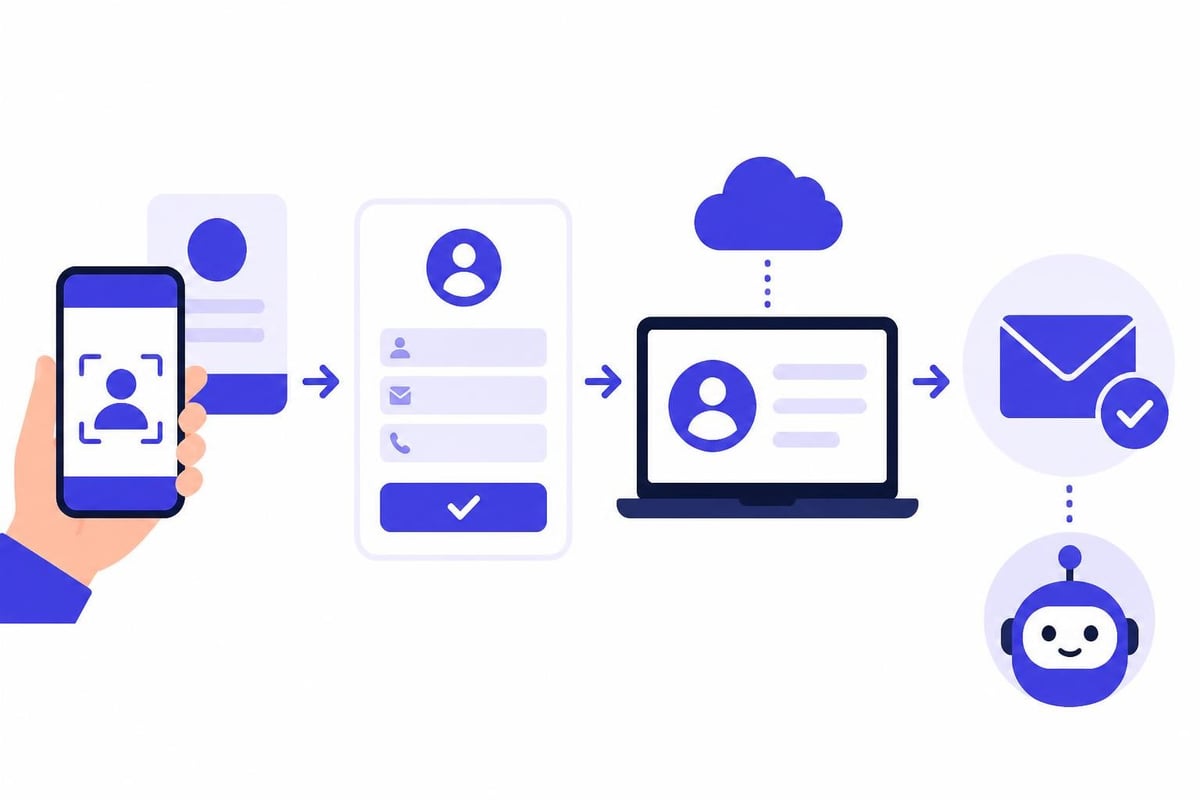
Integration with Business Systems
The real power emerges when your digital card connects to existing business systems. CRM integration means every new contact automatically appears in Salesforce, HubSpot, Pipedrive, or your preferred platform. Calendar integration enables prospects to book meetings without the back-and-forth email dance. HR integration ensures employee cards update automatically when someone changes departments or gets promoted.
These integrations eliminate manual data entry, reduce errors, and ensure no leads fall through cracks. For sales professionals, this automation can save 5-10 hours weekly previously spent on contact management and follow-up coordination.
Analytics and Performance Measurement
Unlike traditional paper cards that disappear into wallets never to be seen again, digital cards provide detailed analytics on every interaction. Understanding these metrics helps you optimize your networking approach and measure ROI on events and conferences.
Key Metrics to Track:
- Total Views: How many times people accessed your card
- Unique Visitors: Number of individual contacts
- Click-Through Rates: Which links and buttons get clicked
- Conversion Actions: Form submissions, calendar bookings, downloads
- Geographic Distribution: Where your contacts are located
- Time-Based Patterns: When engagement peaks occur
- Source Tracking: Which QR codes or links drove traffic
This data transforms networking from guesswork into science. You might discover that conference attendees book 3x more meetings than LinkedIn connections, leading you to prioritize in-person events. Or analytics might reveal your video introduction gets 85% view completion, validating investment in video content.
A/B Testing and Continuous Improvement
When you make digital visiting card assets, think of them as living documents rather than static designs. Test different headlines, rearrange information hierarchies, experiment with various calls-to-action, and measure which versions drive better results.
Simple tests like changing your primary CTA from "View My Portfolio" to "Book a Free Consultation" can double conversion rates. Background colors affect perceived professionalism. Video placement impacts view rates. Systematic testing reveals what actually works for your specific audience rather than relying on generic best practices.
Team Deployment and Corporate Rollout
Organizations deploying digital cards across teams face unique challenges around consistency, adoption, and management at scale. Successful enterprise rollouts require both technical infrastructure and change management strategy.
Technical Infrastructure Requirements
Central administration panels should allow marketing teams to set brand standards (logos, colors, fonts, layouts) while enabling individuals to customize their personal information. HR system integrations automatically create cards for new hires and update them when people change roles. Access controls ensure only authorized personnel can modify brand elements.
Critical Enterprise Features:
- Bulk card creation via CSV import or API
- Template libraries with approved layouts
- Role-based permissions (admin, editor, viewer)
- Department-specific branding options
- Usage analytics at team and company levels
- White-label options for client-facing deployment
- SSO integration with existing authentication systems
These capabilities ensure that when you make digital visiting card systems for hundreds or thousands of employees, the process scales efficiently without sacrificing quality or brand consistency.
Adoption and Training
Even the best technology fails without proper adoption. Successful rollouts include comprehensive training, clear documentation, and ongoing support. Show employees exactly how to share their cards in various contexts. Demonstrate the analytics dashboard and explain which metrics matter. Provide templates and examples rather than starting from blank canvases.
Leadership adoption drives team adoption. When executives actively use and promote digital cards, employees follow suit. Feature success stories internally: "Sarah generated 47 qualified leads at last month's trade show using her digital card's lead capture form." These concrete examples build credibility and motivation.
Privacy, Security, and Compliance Considerations
When you make digital visiting card systems that store and transmit personal information, privacy and security become paramount concerns. Regulations like GDPR in Europe and CCPA in California impose strict requirements on how you handle contact data.
Compliance Checklist:
- Clear privacy policies explaining data usage
- User consent mechanisms for data collection
- Data portability (ability to export all information)
- Right to deletion (complete data removal on request)
- Secure data transmission (HTTPS encryption)
- Regular security audits and updates
- Geographic data residency requirements
- Third-party processor agreements
For businesses operating globally, GDPR compliance provides the highest standard. Solutions built in Europe, particularly Germany, often exceed minimum requirements. When evaluating platforms, verify their compliance certifications and data handling practices match your organization's requirements and risk tolerance.
Mobile Optimization and Cross-Platform Compatibility
The majority of digital card views occur on mobile devices, making mobile optimization essential rather than optional. Your card must render perfectly on iOS and Android devices across various screen sizes and orientations.
Test your card on actual devices, not just browser emulators. Emulators miss subtle rendering issues, touch target sizing problems, and platform-specific behaviors. Verify that buttons are large enough to tap easily (minimum 44x44 pixels). Ensure text remains readable without zooming. Confirm videos play inline without forcing full-screen mode.
Platform-Specific Considerations:
| Platform | Key Requirements | Common Issues |
|---|---|---|
| iOS | Wallet integration, Safari compatibility | Font rendering differences |
| Android | NFC functionality, Chrome optimization | Wide screen size variation |
| Desktop | High-resolution images, hover states | Less common viewing context |
| Tablets | Landscape optimization, larger tap targets | Often overlooked in design |
While native apps provide the richest feature sets, web-based solutions offer universal compatibility without requiring downloads. The best platforms work seamlessly in mobile browsers while offering optional apps for enhanced functionality like offline access and native wallet integration.
Advanced Features and Innovation
As digital card technology matures in 2026, advanced features separate premium solutions from basic offerings. Evaluate which innovations provide genuine value versus novelty for its own sake.
Emerging Capabilities:
- AI-powered contact recommendations based on mutual connections
- Automatic translation of card content into recipient's language
- Voice-activated card sharing through smart assistants
- Augmented reality business card experiences
- Blockchain-based verification of credentials
- Integration with virtual event platforms
- Automated follow-up sequences triggered by card shares
- Rich media backgrounds with interactive elements
One particularly powerful feature is the free digital business card approach that removes barriers to entry, allowing professionals to experience the value before committing to paid features. This try-before-you-buy model accelerates adoption and enables individuals to validate ROI before organizational rollout.
Cost Analysis and ROI Calculation
Understanding the true cost to make digital visiting card systems requires looking beyond subscription fees to include setup time, training, integration development, and ongoing maintenance. However, these costs typically pale in comparison to traditional business card printing, shipping, and replacement expenses.
Cost Comparison Over Three Years:
| Cost Category | Traditional Cards | Digital Cards |
|---|---|---|
| Initial Design | $500-2,000 | $0-1,000 |
| Printing (500 units x 6 reorders) | $1,200-3,000 | $0 |
| Shipping | $300-600 | $0 |
| Updates (3 role changes) | $900-1,800 | $0 |
| Storage and Waste | $100-300 | $0 |
| Total | $3,000-7,700 | $360-2,160 |
Beyond direct cost savings, digital cards provide ROI through improved lead capture rates, faster follow-up cycles, and measurable networking analytics. Organizations report that digital cards increase post-event follow-up rates by 60-80% compared to paper cards that get lost or forgotten.
Best Practices from High-Performing Users
Professionals who generate exceptional results from their digital cards share common practices worth emulating. These behaviors separate those who merely have digital cards from those who leverage them strategically.
Top Performer Habits:
- Update cards immediately when contact information changes
- Test all links and integrations weekly
- Review analytics monthly and adjust strategy accordingly
- Create event-specific versions with tailored CTAs
- Follow up within 24 hours of card shares
- Include personalized video messages for VIP contacts
- Segment cards for different audiences (clients, partners, recruits)
- Track conversion from card share to closed deal
These professionals treat their digital card as a dynamic marketing asset requiring active management rather than a set-it-and-forget-it tool. They experiment with different approaches, measure results, and continuously optimize based on data.
When you make digital visiting card systems with this mindset, you unlock exponentially greater value than passive users who simply digitize their contact information and stop there. The platform provides the tools, but strategic implementation determines actual results.
Digital visiting cards have transformed from simple contact exchange tools into sophisticated networking and lead generation systems that integrate seamlessly with modern business workflows. By thoughtfully planning your content strategy, designing for mobile-first viewing, leveraging multiple sharing methods, and integrating with your existing business systems, you create a networking asset that works continuously to build your professional network and generate qualified leads. Ready to create your professional digital card and start networking smarter? Spreadly makes it simple to build customizable digital business cards with QR codes, NFC integration, mobile wallet compatibility, and CRM connections-no design skills or apps required.