AI Business Card Scanner App: Streamline Your Networking
13 minutes
1st of July 2026
In this article:
- Understanding AI Business Card Scanner Technology
- Essential Features of Modern AI Scanner Apps
- Integration with Sales and Marketing Workflows
- Choosing the Right Scanner for Your Organization
- Multilingual Support and Global Operations
- Lead Capture at Events and Trade Shows
- Privacy, Security, and Compliance Considerations
- Comparing Leading AI Scanner Applications
- Technical Considerations for Document Scanning Apps
- Automation and Workflow Integration
- Mobile vs. Desktop Scanning Solutions
- Future Trends in Business Card Scanning
- Maximizing ROI from Scanner Technology
- Selecting Between Free and Premium Options
- Implementation Strategy for Teams
- Evaluating Scanner App Performance
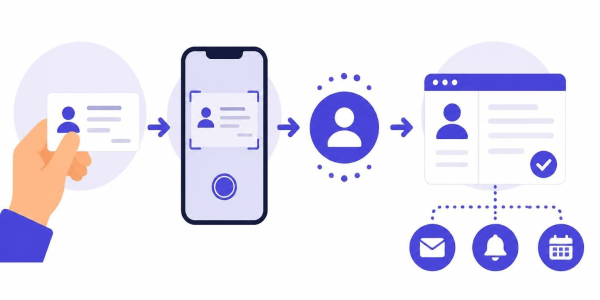
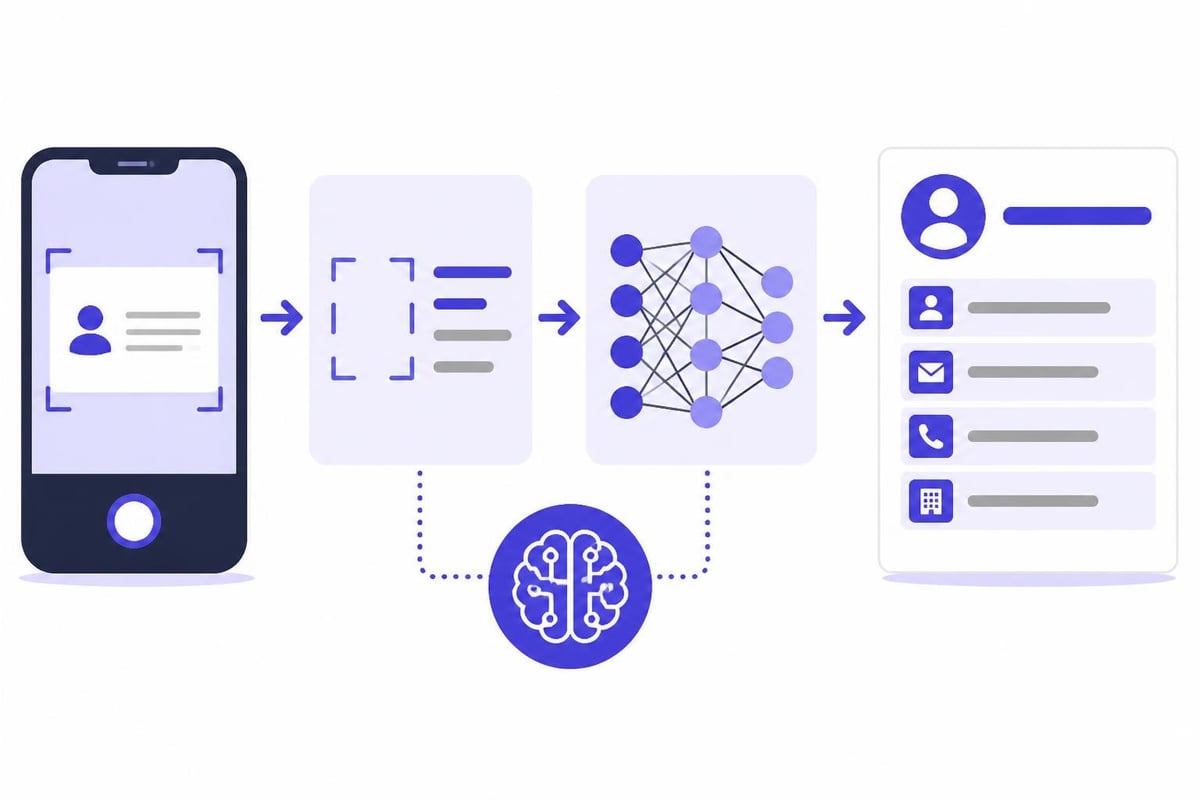
Professional networking has evolved dramatically over the past decade, yet one challenge persists: efficiently managing the business cards collected at conferences, trade shows, and client meetings. An AI business card scanner app solves this problem by transforming paper cards into structured digital contacts in seconds, eliminating manual data entry and reducing errors. These intelligent applications leverage optical character recognition (OCR) and machine learning to capture, organize, and sync contact information across your sales and marketing ecosystem.
Understanding AI Business Card Scanner Technology
The technology powering an ai business card scanner app has advanced significantly beyond simple photo capture. Modern solutions employ sophisticated algorithms that recognize text in multiple languages, identify contact fields automatically, and even enrich data by cross-referencing online sources.
At the core of these applications lies OCR technology, which converts visual text into machine-readable data. However, business cards present unique challenges that researchers have documented extensively, including varied layouts, decorative fonts, and complex backgrounds. AI addresses these obstacles through:
- Deep learning models trained on millions of card images
- Natural language processing to distinguish names from job titles
- Pattern recognition for email addresses and phone numbers
- Contextual analysis to parse company information correctly
How Machine Learning Enhances Accuracy
Traditional OCR struggles with unconventional card designs and handwritten notes. Machine learning models overcome these limitations by learning from corrections and user feedback. Each scanned card improves the system's ability to handle similar formats in the future.
The best ai business card scanner app solutions achieve accuracy rates exceeding 95% on standard cards, with intelligent field mapping that categorizes information without manual tagging. This precision becomes critical when managing hundreds or thousands of contacts from major events.
Essential Features of Modern AI Scanner Apps
Not all scanning applications deliver equal value. When evaluating options, professionals should prioritize features that align with their workflow requirements and integration needs.
| Feature Category | Key Capabilities | Business Impact |
|---|---|---|
| Scanning Technology | Multi-card batch processing, real-time capture, offline functionality | Speeds up collection at events |
| Data Processing | Automatic field mapping, duplicate detection, data enrichment | Reduces manual cleanup time |
| Integration | CRM sync, cloud storage, export formats | Maintains single source of truth |
| Organization | Tags, groups, custom fields, search | Improves contact retrieval |
| Follow-up Tools | Notes, reminders, email templates | Accelerates sales cycles |
Batch Scanning and Bulk Processing
Professional environments demand efficiency. The ability to scan multiple cards consecutively without returning to the home screen between captures saves substantial time during high-volume events.
Advanced solutions process entire stacks in minutes, automatically separating individual cards and extracting information in parallel. This capability proves essential for sales teams managing trade show booths or recruiters attending career fairs.
Smart Data Enrichment
An exceptional ai business card scanner app extends beyond what's printed on the card. Data enrichment features pull additional information from LinkedIn profiles, company databases, and public records to provide context about each contact.
- Company size and industry classification
- Recent news about the organization
- Social media profiles and activity
- Mutual connections and relationship paths
- Technology stack and tools used
This enriched data transforms basic contact information into actionable intelligence that sales and business development teams leverage for personalized outreach.
Integration with Sales and Marketing Workflows
The true value of an ai business card scanner app emerges when it connects seamlessly with existing business systems. Isolated contact databases create silos that fragment customer relationships and duplicate efforts.
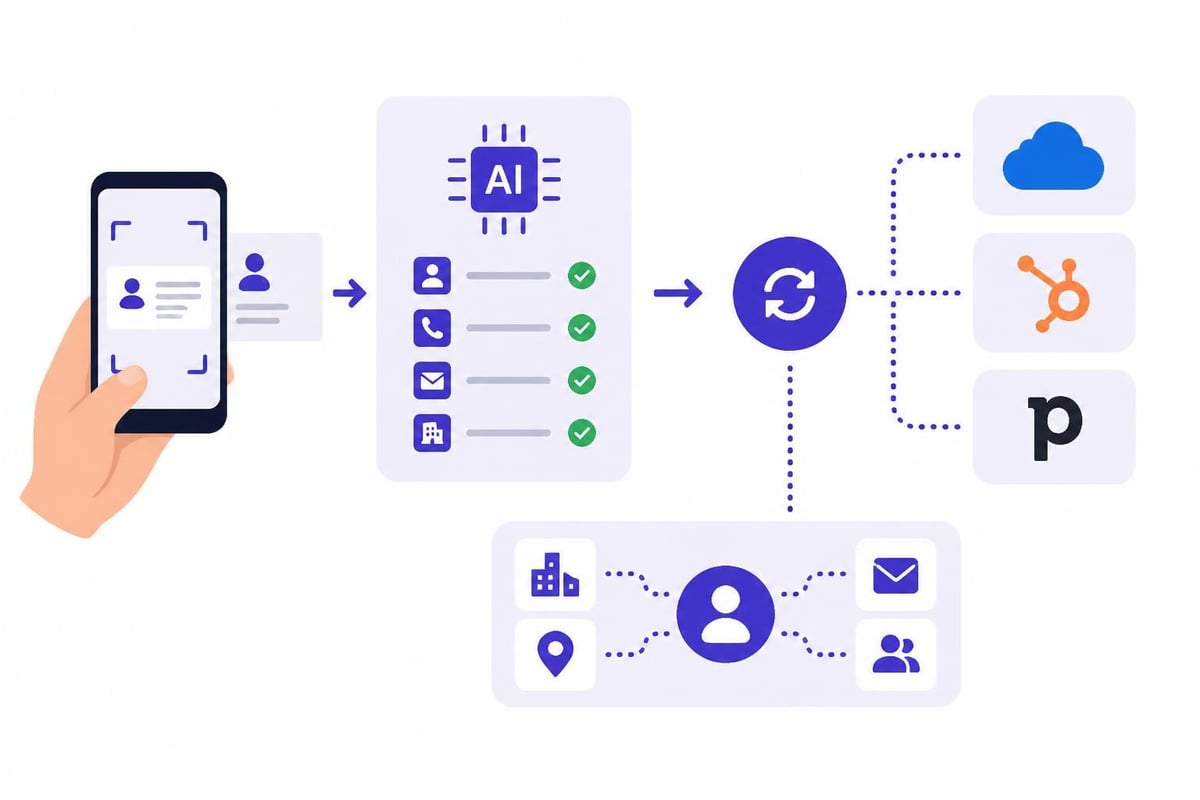
Professional-grade scanning solutions offer native integrations with major CRM platforms, ensuring every captured contact flows automatically into your sales pipeline. This eliminates the manual export-import cycle that creates delays and data inconsistencies.
CRM Synchronization Strategies
Different organizations require different synchronization approaches. Some prefer real-time sync that instantly creates CRM records, while others opt for manual review queues that allow qualification before import.
Real-time sync works best for:
- Field sales teams needing immediate access
- Event staff capturing qualified leads
- Organizations with established data quality rules
Batch sync with review suits:
- Companies with strict data governance
- Teams wanting to add notes before import
- Situations requiring categorization by source
The most sophisticated platforms offer customizable field mapping, allowing businesses to match scanned data to their specific CRM schema rather than forcing standard formats.
Choosing the Right Scanner for Your Organization
The market offers dozens of options, from simple consumer apps to enterprise-grade solutions with advanced capabilities. Selecting the right ai business card scanner app requires understanding your specific requirements and evaluating how different platforms address them.
Individual Professional Needs
Freelancers, consultants, and solo entrepreneurs prioritize simplicity and cost-effectiveness. For these users, consumer-focused apps like CardOmi provide instant scanning and smart organization without complex setup.
Key considerations for individual use:
- Ease of use with minimal learning curve
- Mobile-first design for on-the-go scanning
- Export flexibility to various formats
- Privacy controls for sensitive contacts
- Affordable pricing or free tier availability
Enterprise Requirements
Organizations deploying scanner apps across sales teams face different priorities. Centralized management, security compliance, and integration depth become critical factors.
Enterprise solutions like those offered by Bizarc provide administrative dashboards for managing user accounts, setting permissions, and enforcing data policies. These platforms typically include:
- Single sign-on (SSO) integration with corporate identity systems
- Role-based access control for different team functions
- Audit logs tracking all scanning and export activities
- GDPR compliance features for European operations
- API access for custom integrations
Multilingual Support and Global Operations
International business demands scanner apps that handle multiple languages and character sets. A truly effective ai business card scanner app recognizes text in languages ranging from Latin alphabets to Chinese characters, Arabic script, and Cyrillic.
QuickCard supports over 30 languages, demonstrating the global capabilities available in modern scanning solutions. This multilingual competency ensures accurate capture regardless of where business relationships originate.
Handling Complex Character Sets
Asian business cards present particular challenges with vertical text orientation, mixed character types, and dense information layouts. AI models trained specifically on these formats deliver significantly better results than generic OCR engines.
The best applications automatically detect card language and apply appropriate recognition models without requiring manual selection. This seamless handling accelerates scanning workflows when managing contacts from diverse geographic regions.
Lead Capture at Events and Trade Shows
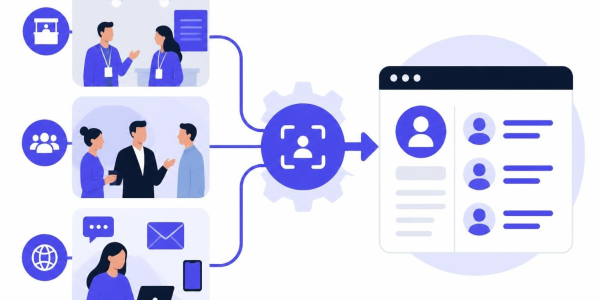
Trade shows and conferences represent concentrated networking opportunities where professionals collect dozens or hundreds of cards within days. An ai business card scanner app transforms this influx from an administrative burden into immediate sales opportunities.
Modern event-focused scanning solutions go beyond simple contact capture. They enable real-time lead qualification, automated follow-up scheduling, and instant CRM updates that activate sales sequences while prospects remain engaged.
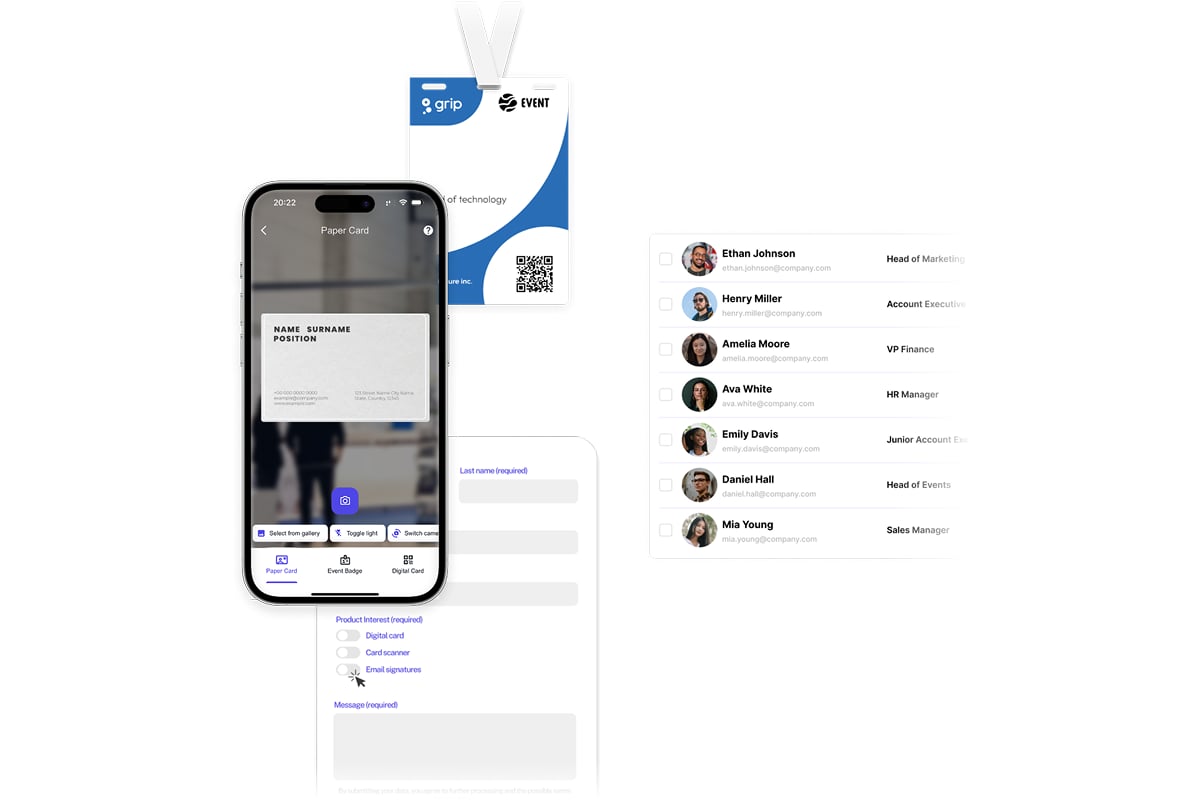
Spreadly's lead capture technology exemplifies this evolution, allowing teams to scan business cards and trade show badges in seconds while AI fills in missing information automatically. Custom fields link directly to CRM systems, eliminating manual data transfer and making trade show ROI immediately visible.
Best Practices for Event Scanning
Maximizing the value of scanner technology at events requires strategic implementation:
- Pre-configure CRM mapping before the event begins
- Train team members on consistent scanning procedures
- Establish qualification criteria for immediate vs. future follow-up
- Add contextual notes during conversations while details remain fresh
- Schedule next actions before leaving the event
Organizations that systematize their event scanning processes report 40-60% faster follow-up times compared to manual card processing. This speed advantage directly impacts conversion rates, as engaged prospects receive outreach while your interaction remains memorable.
Privacy, Security, and Compliance Considerations
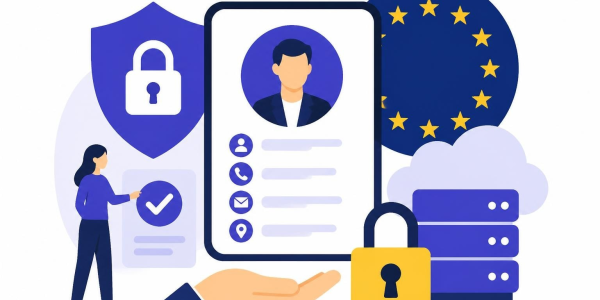
Scanning business cards creates digital records containing personal information, triggering data protection obligations under regulations like GDPR, CCPA, and industry-specific compliance frameworks. Professional users must evaluate how scanner apps handle, store, and transmit this sensitive data.
Data Storage and Encryption
Enterprise-grade ai business card scanner app solutions implement multiple security layers:
- End-to-end encryption during transmission
- Encrypted storage on devices and servers
- Secure authentication requiring strong credentials
- Geographic data residency options for regulatory compliance
- Regular security audits by independent firms
Consumer apps may store data less securely, potentially exposing contact information to unauthorized access. Business users should verify storage practices, particularly when scanning client or prospect information subject to contractual confidentiality obligations.
Consent and Data Retention
Ethical contact management requires obtaining consent before adding individuals to marketing databases. When someone hands you a business card, they provide implied consent for professional contact, but automated list building may exceed these boundaries.
Responsible scanner implementations include features for:
- Marking contacts as opt-in or opt-out for marketing
- Setting automatic deletion schedules for aged contacts
- Providing easy unsubscribe mechanisms
- Documenting consent basis and timing
Comparing Leading AI Scanner Applications
The competitive landscape includes established players and innovative newcomers, each emphasizing different capabilities. Understanding these distinctions helps identify the optimal solution for specific use cases.
| App Name | Primary Strength | Best For | Notable Limitation |
|---|---|---|---|
| CardOmi | Instant organization | Individual professionals | Limited enterprise features |
| QuickCard | Multilingual support | International teams | Smaller integration ecosystem |
| Bizarc | Smart follow-up automation | Sales professionals | Learning curve for advanced features |
| Enrichcard | Contact intelligence | Business development | Premium pricing tiers |
CardAction distinguishes itself through batch scanning capabilities and instant follow-up features designed specifically for iOS and Android users who manage high contact volumes. Meanwhile, Meishi emphasizes voice context capture and offline reliability, addressing situations where internet connectivity proves unreliable.
For Shopify merchants and ecommerce professionals seeking to network more effectively, platforms like Talk Shop provide community support alongside tools for building business relationships in digital commerce environments.
Technical Considerations for Document Scanning Apps
Beyond business card specifics, understanding broader document scanning technology provides context for evaluating specialized applications. TechRadar's comprehensive review of document scanning apps highlights features like OCR capabilities and cloud integration that apply equally to card scanning.
The principles underlying effective document digitization translate directly to business card processing:
- Image preprocessing adjusts lighting, contrast, and perspective
- Edge detection identifies card boundaries for automatic cropping
- Noise reduction eliminates background elements and artifacts
- Resolution optimization balances file size with text clarity
Mobile Device Capabilities
An ai business card scanner app leverages smartphone cameras that now rival dedicated scanners in quality. Modern devices capture sufficient detail to read even small print on cards, while computational photography enhances results through:
- Multi-frame capture with automatic alignment
- HDR processing for challenging lighting conditions
- AI-powered sharpening to enhance text readability
- Auto-focus systems optimized for close-range capture
These technical advances mean the scanner in your pocket performs as well or better than dedicated hardware from just a few years ago.
Automation and Workflow Integration
The ultimate goal extends beyond digitizing cards to automating downstream processes. Advanced ai business card scanner app platforms trigger workflows based on scanned information, creating sophisticated automation sequences.
Automated Lead Routing
When sales organizations scan contacts at events, intelligent routing ensures leads reach appropriate team members based on territory, industry, or product interest. This happens automatically through:
- Field-based rules that evaluate company size, location, or industry
- Round-robin assignment distributing leads evenly across reps
- Priority scoring that fast-tracks high-value prospects
- Automatic task creation assigning follow-up activities with deadlines
Integration with Communication Platforms
Modern scanner apps connect with communication tools to accelerate relationship building. After scanning a card, the system can:
- Send personalized connection requests on LinkedIn
- Schedule automated email sequences tailored to prospect profile
- Create calendar reminders for follow-up calls
- Generate customized proposals based on conversation notes
- Add contacts to targeted nurture campaigns
Organizations leveraging call center outsourcing through providers like Focus Services can route scanned leads directly to outbound sales teams, ensuring professional follow-up at scale while maintaining personalized communication.
Mobile vs. Desktop Scanning Solutions
While most scanning happens on smartphones for convenience, some workflows benefit from desktop processing. Understanding when to use each approach optimizes efficiency.
Mobile scanning excels for:
- Real-time capture at events and meetings
- Immediate CRM synchronization in the field
- Quick reference during follow-up calls
- On-the-go contact access without computer dependency
Desktop solutions work better for:
- Batch processing large card collections
- Detailed review and data correction
- Complex field mapping and customization
- Integration with desktop-only business applications
Hybrid approaches allow mobile capture with desktop review, combining convenience and thoroughness. Cards scan instantly on smartphones, then sync to desktop applications where administrators refine data before final CRM import.
Future Trends in Business Card Scanning
The evolution of ai business card scanner app technology continues accelerating, with several emerging capabilities poised to reshape contact management practices.
Augmented Reality Integration
Future scanner apps will overlay digital information directly onto physical cards viewed through smartphone cameras. Point your device at a card, and AR displays:
- Recent LinkedIn activity and posts
- Mutual connections and relationship paths
- Company news and funding announcements
- Suggested talking points for follow-up conversations
This contextual intelligence appears in real-time, transforming business cards from static information sources into interactive networking tools.
Voice-Activated Scanning and Annotation
Voice control eliminates the manual interaction currently required for adding notes and context. After scanning a card, sales professionals speak observations like "met at healthcare conference, interested in enterprise solution, follow up next Tuesday," and AI transcribes and categorizes these inputs appropriately.
Natural language processing enables conversational commands: "scan this card and schedule a demo for next week" triggers both digitization and calendar booking in a single step.
Predictive Lead Scoring
Machine learning models will analyze scanned card information alongside historical data to predict conversion likelihood and optimal engagement strategies. The system automatically prioritizes follow-up based on:
- Title and company characteristics similar to past customers
- Industry trends indicating increased buying intent
- Timing factors suggesting favorable purchasing windows
- Competitive intelligence about prospect's current solutions
This predictive capability helps sales teams focus energy where it generates maximum return.
Maximizing ROI from Scanner Technology
Technology investment requires measurable returns. Organizations deploying an ai business card scanner app should track specific metrics demonstrating value:
Efficiency Metrics:
- Time saved per contact processed
- Reduction in manual data entry hours
- Decrease in duplicate contact creation
- Improvement in data accuracy rates
Sales Performance Indicators:
- Acceleration in follow-up timing
- Increase in contact-to-opportunity conversion
- Growth in pipeline value from scanned leads
- Enhanced win rates on event-sourced deals
Adoption Measures:
- Percentage of team actively using scanner
- Average cards scanned per user per month
- Integration utilization rates
- User satisfaction scores
Organizations serious about networking efficiency should establish baselines before deployment, then measure improvements quarterly to validate technology investment and identify optimization opportunities.
Selecting Between Free and Premium Options
The ai business card scanner app market spans free consumer applications to enterprise platforms costing thousands annually. Understanding what justifies premium pricing helps optimize technology spending.
When Free Tiers Suffice
Individual professionals scanning fewer than 50 cards monthly often find free applications adequate. These typically include:
- Basic OCR scanning and contact creation
- Manual export to standard formats
- Limited cloud storage
- Mobile-only access
Apps like Snap In demonstrate the capabilities available at no cost, offering AI-based parsing with user-friendly design that serves casual networking needs effectively.
Premium Features Worth Paying For
As contact volumes increase and business processes grow sophisticated, premium features deliver substantial value:
- Unlimited scanning without monthly caps
- Advanced CRM integrations with bi-directional sync
- Team collaboration features for shared contact databases
- Custom field mapping matching specific business requirements
- Priority support with dedicated account management
- API access enabling custom integrations
- Analytics and reporting on networking activity and results
Organizations managing sales teams should evaluate total cost of ownership, including time savings and revenue impact, rather than focusing solely on subscription fees.
Implementation Strategy for Teams
Rolling out scanner technology across sales organizations requires thoughtful planning to ensure adoption and maximize value realization.
Phased Deployment Approach
Start with pilot groups rather than company-wide launches. Select enthusiastic early adopters who will provide feedback and serve as champions when expanding deployment.
Phase 1: Pilot (4-6 weeks)
- Deploy to 5-10 users representing different roles
- Gather feedback on usability and integration effectiveness
- Refine configuration based on real-world usage patterns
- Document best practices and success stories
Phase 2: Expansion (8-12 weeks)
- Roll out to broader sales organization
- Conduct training sessions emphasizing pilot learnings
- Establish support channels for questions and troubleshooting
- Monitor adoption metrics and address obstacles
Phase 3: Optimization (Ongoing)
- Analyze usage data to identify improvement opportunities
- Enhance integrations based on workflow observations
- Update training materials with advanced techniques
- Measure business impact through KPI tracking
Training and Change Management
Technology succeeds only when users embrace it. Effective training programs include:
- Live demonstrations showing real scenarios
- Hands-on practice with immediate feedback
- Quick reference guides for common tasks
- Video tutorials accessible on-demand
- Regular tips highlighting underutilized features
Creating internal champions who evangelize the technology accelerates adoption more effectively than top-down mandates. Recognize and reward users who demonstrate exceptional utilization and share their expertise with colleagues.
Evaluating Scanner App Performance
Before committing to a specific ai business card scanner app, conduct thorough evaluation using representative business cards from your industry and network.
Testing Methodology
- Collect diverse card samples including unusual layouts, multiple languages, and challenging designs
- Scan identical cards across different applications for comparison
- Measure accuracy by comparing extracted data to actual card content
- Time the process from scan initiation to CRM record creation
- Assess user experience noting friction points and confusing elements
- Test integrations with your specific CRM and tools
- Evaluate support responsiveness by submitting questions to vendors
This systematic approach reveals performance differences not apparent from marketing materials or feature lists.
Accuracy Benchmarking
Create a scorecard measuring field-by-field accuracy:
- Name (first and last separated correctly)
- Company name (with proper capitalization)
- Job title (complete and accurate)
- Email address (no character errors)
- Phone number (with correct country code)
- Physical address (street, city, state, postal code)
- Website URL (complete and functional)
Apps achieving 90%+ accuracy across all fields warrant serious consideration, while those below 80% likely create more work than they eliminate.
The adoption of an ai business card scanner app represents a strategic investment in networking efficiency that pays dividends through faster follow-up, improved data quality, and enhanced sales productivity. As these technologies continue evolving with augmented reality integration and predictive intelligence, early adopters position themselves for competitive advantage in relationship-driven business development. Organizations ready to modernize their contact management should explore Spreadly's digital business card solutions, which combine intelligent scanning capabilities with customizable cards, seamless CRM integration, and team management features designed for professionals who understand that lasting business relationships begin with exceptional first impressions and flawless follow-through.